
A pilot who flies with ForeFlight and has Glide Advisor turned on sees a ring on the map: how far the airplane can glide from where it is. That ring is arithmetic. ForeFlight takes the best glide speed and glide ratio the pilot typed in for the airplane and works out the distance. If the numbers are from the handbook and the airplane isn't flown the handbook's way after the engine quits, the ring is wrong.
ForeFlight 18.9, which the company dates November 2026, adds a second ring that doesn't depend on those numbers. ForeFlight calls it TrueGlide, and it comes with every subscription plan, the $130-a-year Starter plan included.
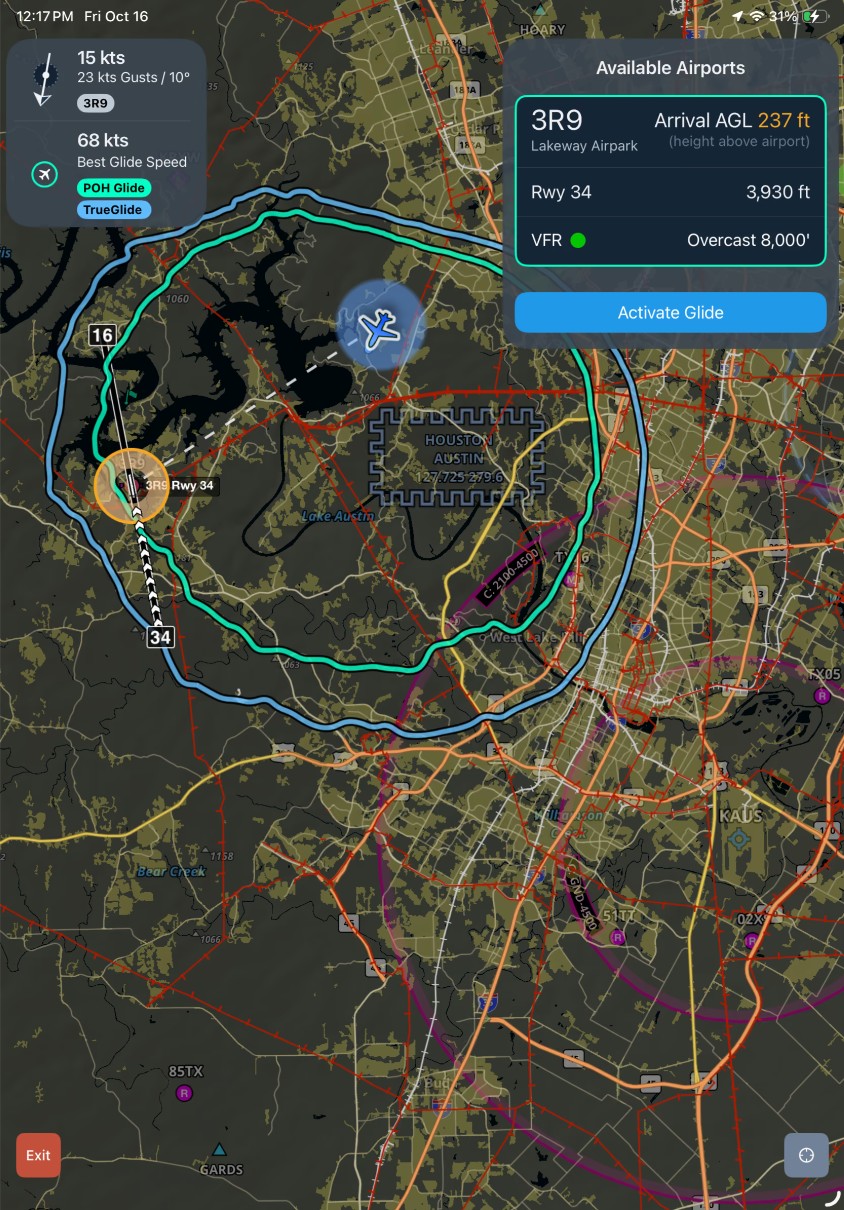
What TrueGlide shows
TrueGlide works inside Emergency Glide Mode, the stripped-down view ForeFlight added earlier this year for an engine failure. According to ForeFlight's description, when the app "detects a stable descent rate" it draws a blue ring next to the existing green one. The green ring is still the one figured from the airplane's "configured best glide speed and glide ratio." The blue ring is "a dynamic estimate of your glide range based on your actual descent performance and wind conditions."
So the two rings answer different questions. The green one says how far the airplane should glide if it does what the profile says. The blue one says how far it is going at the rate it is coming down right now. ForeFlight's advice is to "compare both rings to better assess your available landing options."
Where the blue ring sits inside the green one, the airplane isn't making its book glide. The speed may be off best glide, the propeller may be windmilling where the handbook's figure assumed otherwise, or the ratio in the profile may simply be generous. Where it sits outside, the profile's figure is conservative. In both cases the blue ring is the one built on what the airplane is doing.
It has a limit that follows from how it works: there is no blue ring until the airplane is in a steady descent. Before that, and for planning a route with glide range in mind, the green ring is all there is, and it is only as good as the two numbers behind it. The release is a good reason to open the aircraft profile and check them against the handbook, or for an amateur-built airplane against what Phase I testing found (Hangar Flying's Test & Validation app writes a Phase I test plan from AC 90-89C).
ForeFlight doesn't say how long a descent has to be steady before the ring appears, or where the wind in the estimate comes from. It also states no caution about relying on either ring. TrueGlide can be turned off with a new switch in Map Settings, which shows only when Glide Advisor is on.
Emergency Glide Mode, for those who haven't set it up
TrueGlide does nothing until Emergency Glide Mode is in use, and that takes a minute of setup on the ground. ForeFlight's instructions are to turn on Glide Advisor under Map Settings and enter the airplane's best glide speed and ratio. In flight, a green Airports button in the bottom right corner of the map then opens the mode.
What it shows, by ForeFlight's account: airports within glide range, in a sidebar and on the map, "ranked by distance, runway length, altitude, heading, and winds aloft." Choosing one and tapping Activate Glide makes a direct route and shows time en route, a suggested runway, frequencies, winds and the projected height above the ground on arrival. If no airport is in range, the map shades "Possible Landing Areas" in green and marks obstacles such as power lines and roads. A red Exit button returns to the normal map.
Emergency Glide Mode comes with all plan levels worldwide. The Possible Landing Areas map is built from U.S. Geological Survey data and covers the lower 48 states only.
Traffic icons by aircraft type
The second change a pilot will notice is on the traffic layer. With an ADS-B In or FLARM receiver connected, a new Enhanced Traffic Icons switch in Map Settings replaces the plain arrow for each target with a shape for its kind of aircraft. ForeFlight lists "commercial airlines, private jets, single-engine pistons, and other aircraft types," shown "when this information is available." A target that doesn't report a type keeps the arrow.
Knowing that the target ahead on final is a jet and not a trainer says something about its speed and its wake before it's in sight. This one needs an Essential plan ($260 a year) or above.
Runway length in Dynamic Procedures
For pilots who use Dynamic Procedures, the sidebar now shows the runway's published landing distance available, or its total length, and the airport's transition altitude or level, at the top of the route section. Dynamic Procedures is part of Essential plans and above in the United States, Canada and most of Europe.
The rest of 18.9
The other five items in the release are for ForeFlight's Business and military plans: safety event reporting for operators with a safety management system, alternates on the Active Navlog, a map layer of reported GPS interference, and two military low-level features. None of them appears on an individual plan.
ForeFlight's release page gives no minimum iPadOS version or device for 18.9. Its pricing page lists the individual plans at $130 (Starter), $260 (Essential) and $390 (Premium) a year, and says the plan names were changed with "prices and features" the same as before.
Sources: ForeFlight, release 18.9, November 2026; ForeFlight, "Emergency Glide Mode: TrueGlide"; ForeFlight, "Emergency Glide Mode," April 2026; ForeFlight, "Enhanced Traffic Icons"; ForeFlight, "New in Dynamic Procedures"; ForeFlight, pricing. All read Nov. 13, 2026.
Picture: a ForeFlight screen in Emergency Glide Mode, provided by Hangar Debrief's publisher.