
A log is yours alone until you share it. Sharing is set on the project’s Project page, in the Sharing card.
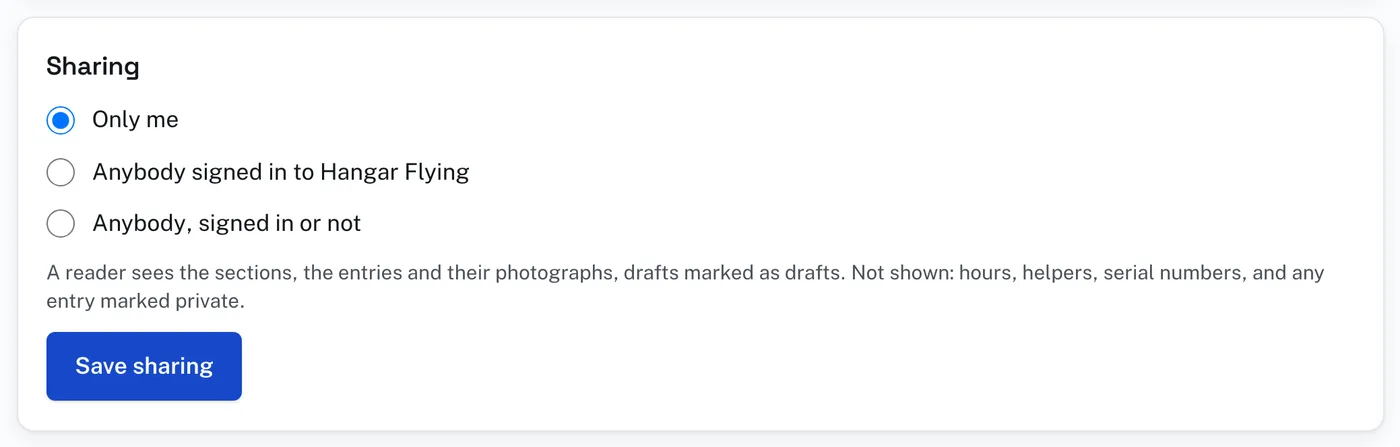
To share a log:
- Open the project and press Project in the row under the bar.
- Under Sharing choose Only me, Anybody signed in to Hangar Flying, or Anybody, signed in or not.
- Press Save sharing.
- Press See it as a reader does to look at the page others will see.
The line at the foot of the Log page says where the log stands: Not shared, Shared with anybody signed in, or Shared with anybody. Share this log, on that line, shares it with anybody in one press. Stop sharing makes it yours alone again.
A reader sees the project’s name, what is being built, the primary builder’s name, where the work is done and the date started. Under them are the sections with how far along each is, and the entries: the date, the section, the task, the work performed, methods, lesson learned, the plans reference, and the photographs with their captions. A draft is marked Draft.
A reader is not shown hours, helpers, serial numbers, or any entry marked Private entry. A reader cannot change anything.
A shared log is listed under Shared logs on the Builders Log’s first page. One shared with anybody is listed for everybody, signed in or not. One shared with anybody signed in is listed only for people who are signed in. The address of the reader’s page can be sent to somebody: it is the page See it as a reader does opens.
Drafts are shown in a shared log, marked Draft. Before sharing, mark Private entry on any entry you do not want read.