
Support

Align two instruments on their centers

Member tool

Select the instrument that should stay put first (the anchor), then Shift-click the ones to move. Click Align Centers in the tool row (7 in the picture).
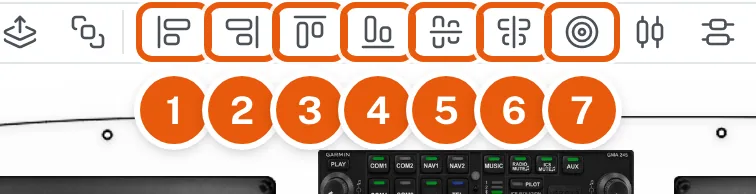
The seven Align buttons in the tool row, numbered 1 to 7; Align Centers is 7


Clicking a large display, Shift-clicking a small one, and clicking Align Centers: the small one moves onto the center of the large one

The selected instruments move so their centers sit on the anchor's center, across and up and down.

Not what you needed? Search Help or ask us