
Sign in. You land on Home: click My designs on its Panel Designer card. On any Panel Designer page, My designs is the first page in the row under the bar; it is also in the menu under the button with your name.
Click New panel design. On the next page:
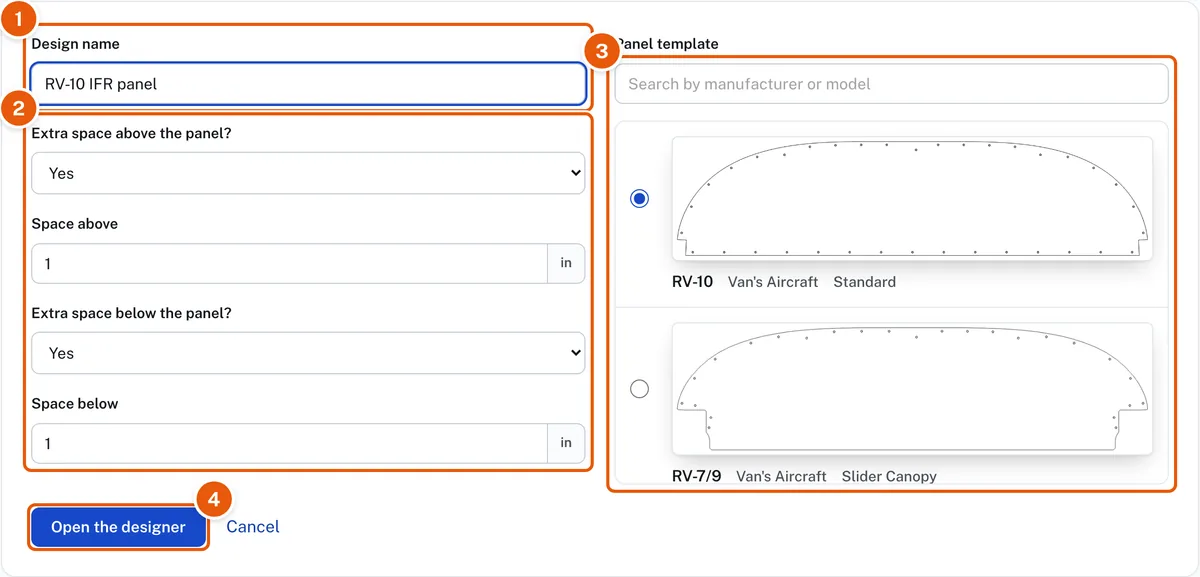
- Enter a Design name, for example "RV-10 IFR panel".
- Extra space above the panel and Extra space below the panel start at Yes, 1 inch each, which gives you room to work around the template. Change the inches, or choose No for none. You can change either later from the design's card on My designs (the Space above and below button, the up-and-down arrows): everything on the design keeps its place on the panel. A space cannot be made smaller while instruments or placards sit in it; the box stays open and says how many, so move them onto the panel first. A size may be typed as 1.5 or 1,5. If items sit in space you try to take away, the message says how much space the design needs above and below; enter at least that much, or move the items onto the panel first.
- Pick the Panel template for your aircraft from the list on the right. You can change it later in the designer with Change template; see Change the template of a design. Type in the search box to shorten the list: a manufacturer, a model or a keyword. Hyphens and spaces do not matter, so "rv3", "RV-3" and "rv 3" all find the RV-3. The pictures are large enough to tell similar templates apart.
- Click Open the designer.
The designer opens with your panel template filling the window. Add and arrange instruments, and use Save in the menu bar before you leave.
Start from your aircraft's page instead. Open Panel templates in the row under the bar, choose your aircraft, and click a template's card. The New panel design page opens with that template selected at the top of the list, and all that is left is the design name. See Panel templates by aircraft.
If your aircraft is not listed, use Upload its panel template at the foot of the page. See Upload your own panel templates and instruments.
After an account's 14 days, this needs a membership. See Every tool for 14 days, then membership.