
The Bill of materials lists what your saved design is made of: its equipment, what that equipment needs to be installed, and the panel hardware the layout calls for. It took the place of the equipment list on 15 Oct 2026.
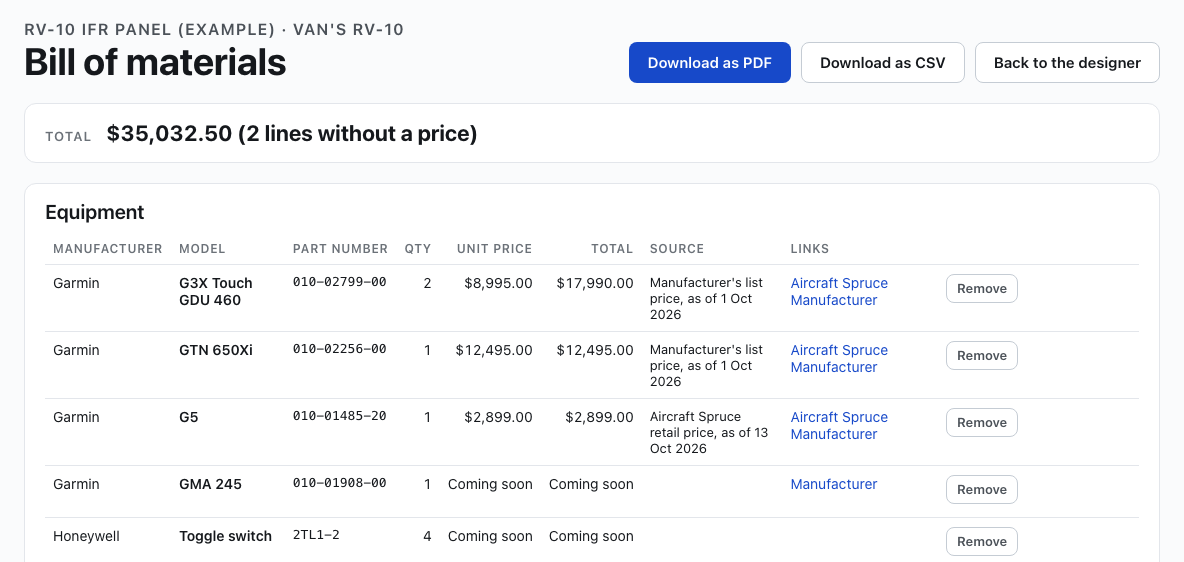
Click Bill of materials in the designer's menu bar (Materials in a narrower window). The designer saves your design first, then the bill of materials opens in a new tab. The tab says "Saving your design…" for a moment while that happens. A design needs at least 3 instruments before it opens.
Equipment
One line for each instrument on the design, with Qty, how many of it are placed: six identical toggle switches are one line with a Qty of 6. Placards and add-on panels are not equipment lines. Each line gives the manufacturer, model, part number, the unit price and the line's total, and where the price came from and when: the manufacturer's MSRP, else Aircraft Spruce's retail price where the manufacturer publishes none. An instrument without a price reads Coming soon. Blanks, switches, breakers, knobs and the like are not counted as missing a price, as in the designer's MSRP. A link you give your own line shows as Your link.
- Remove takes a line off the bill of materials, for something you already have. The design keeps the instrument. It is listed under Removed from this list, with Restore to put it back.
- Add an item adds something that is not on the panel. Search the library by manufacturer, model or part number and choose it, or type the item, its manufacturer and part number yourself. Give its Qty (1 to 999) and, if you like, a Unit price and a Link. Adding the same library item again raises its Qty by one. An item you added is marked Added by you: click Edit to change any of it, or Remove.
What you add and remove is kept with the design, on every computer.
Change any line
Every line has Edit, in Equipment, System items, Also needed and Panel hardware. It opens a card with the line's item, manufacturer, part number, Qty, unit price and link (Panel hardware lines have the item and Qty). Change what you need and click Save. The line's source then reads Your entry, and the totals use your figures. The card also shows what the library has for the line, and Reset to the library's puts it back.
Your changes are kept with this design only. If the library changes a line you edited later, for example a new price or another of the instrument placed, the line is shaded and shows Update. It opens a card with yours and what the library has now, side by side:
- Use the update takes what the library changed and keeps the rest of your changes.
- Keep mine keeps yours. Update goes away until the library changes that line again.
Also needed
What Aircraft Spruce's product page says an instrument needs besides itself, such as a connector kit, a tray or an antenna. Each item's quantity is multiplied by how many of the instrument are on the list, and an item two instruments both need is one line, with For naming both. An instrument with nothing recorded adds nothing here.
Panel hardware (estimated)
- Panel blank: the template's width and height. Its material and thickness are not recorded.
- Each add-on panel piece, by its name and size.
- The screws, nuts and nutplates the instruments mount with, from their makers' installation data, added up across the design. Each line names the instruments that use it. An instrument whose mounting is not yet in the library is named under Mounting not yet known.
- Placards: how many are on the design, and below the table the words of each, with how many carry the same words.
Totals
The Total at the top, and a total under each section, add up what has a price, then say how many lines have none, for example "$12,345.00 (3 lines without a price)".
Weight and electrical load
Under the total, Weight adds up the equipment's weight, and Electrical load at 14 V the current it draws on a 14-volt bus, typical and peak, each from the figures its manufacturer publishes. Each says how many lines have no figure; nothing is guessed. Switches, breakers and blanks draw nothing and are not counted as missing a figure. The Equipment table shows each line's Weight and Current at 14 V, times its quantity.
Wiring and Tools are listed last: they come later.
Download it
- Download as PDF: the bill of materials with your name, the design and a picture of the panel.
- Download as CSV: one row per line, for a spreadsheet: section, description, manufacturer, part number, quantity, unit price, total, source, the link you gave a line of your own, and each equipment line's weight and current at 14 V, typical and peak.
- Back to the designer closes the tab and returns you to your design.
The bill of materials and its prices are for you. To have the panel fabricated, use CAD, Cut, Paint & Label in the designer's menu bar; that request to our shop carries no prices. See Request a quote: CAD, cut, paint and label.
Add to my build
To put the design's instruments on your aircraft's equipment list on Hangar Flying, and its picture in the aircraft's Builders Log, click Add to my build in the menu bar. See Add to my build. Member tool