
Equipment opens as a card per system, the ones that need something first: Airframe, Avionics, Cabin and environment, Electrical system, Flight controls, Fuel system, Hydraulic system, Landing gear, Powerplant, Propeller and Restraint systems. Each says how many items are left to record and carries a chip. The count at the top right, “2 of 49 recorded”, is the whole aircraft.
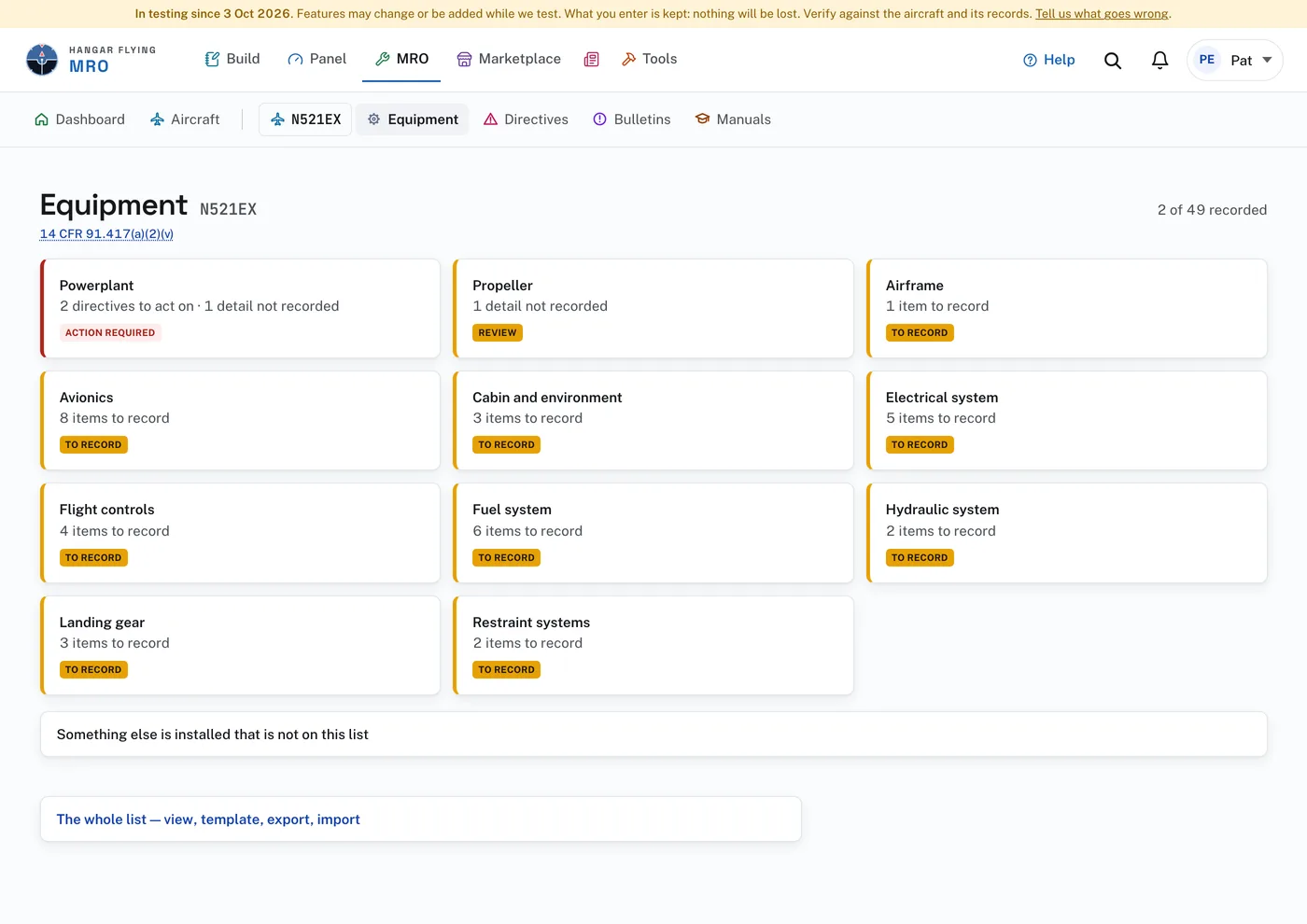
A chip is amber while items are still to record (To record), or while a recorded part has a detail missing (Review). Red means a directive applies and is not dealt with. A quiet green means settled.
Open a system and every item the checklist expects is a card: the item, what is recorded for it, and a chip. “To record” is an item every aircraft of the type has. “If installed” is one it may not have. Open a card to record the part, or to see the part’s details, directives and photographs once it is recorded.
Also on the page:
- “Something else is installed that is not on this list” records a part the checklist did not ask about.
- “The whole list — view, template, export, import” opens the Equipment list page.
- No longer installed, at the foot, lists parts that were removed.
“Appliance” is the FAA’s word (14 CFR 1.1) for installed equipment that is not part of the airframe, engine, or propeller: instruments, radios, magnetos, pumps.